List Articles From some Categories + "created By" And/or "created by alias" fiel
- Posted by Pierfrancesco (6) Offline
Hi I'm using the MINIFRONTPAGE Module (FREE Version) to list article with Image + TITLE + DATE as you can see below:
prnt.sc/nquSuzLF7f3B
I'm looking a WAY to show close to the date or below or somewhere else even the "created by" and/or "created by alias" field from the article content.
As per you know how is this possible, using MINIFRONTPAGE MODULE ?
THX for support!
9 months 1 week ago - 9 months 1 week ago #1
by Pierfrancesco
prnt.sc/nquSuzLF7f3B
I'm looking a WAY to show close to the date or below or somewhere else even the "created by" and/or "created by alias" field from the article content.
As per you know how is this possible, using MINIFRONTPAGE MODULE ?
THX for support!
Last edit: 9 months 1 week ago by Pierfrancesco. Reason: chance some error
Please Log in or Create an account to join the conversation.
- Posted by TemplatePlazza (5468) Offline
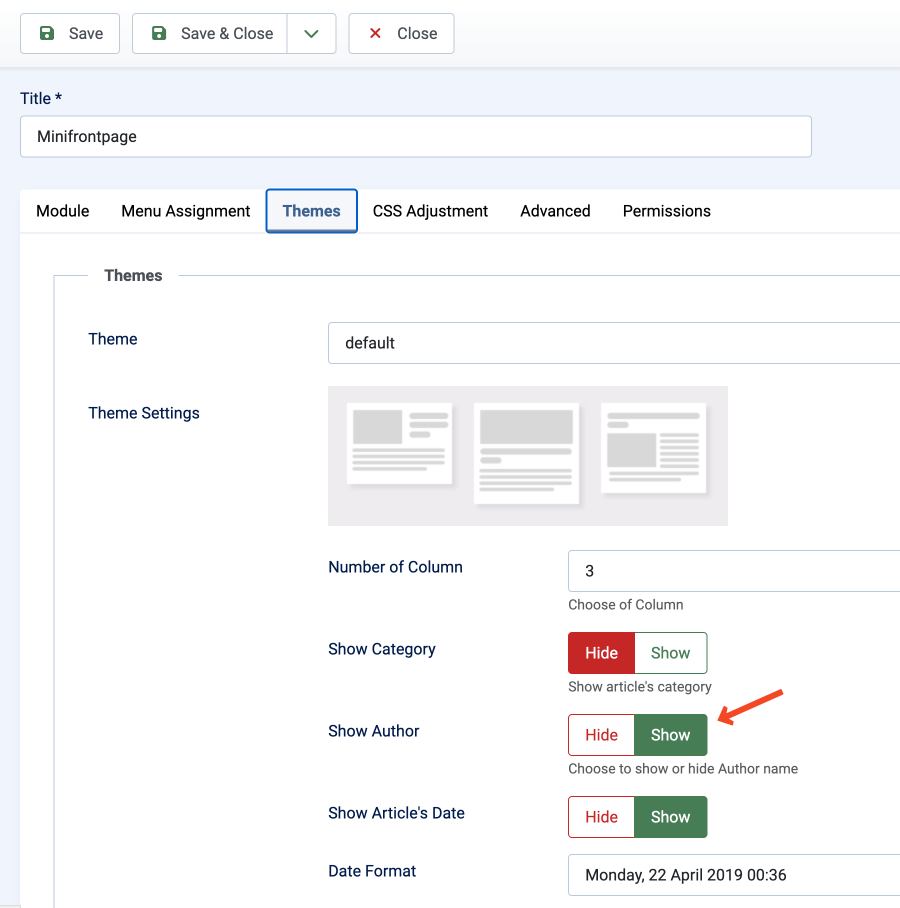
Hi, yes,you just need to switch the Show Author field to Yes in the theme settings, right?
9 months 1 week ago #2
by TemplatePlazza
Attachments:
Please Log in or Create an account to join the conversation.
- Posted by Pierfrancesco (6) Offline
OK, but I need to use the "created by ALIAS" that is different im my articles.
Can I create an ecception on code or a correction on code in order to ADD the field for "created by alias" instead of "author" field ?
9 months 1 week ago #3
by Pierfrancesco
Can I create an ecception on code or a correction on code in order to ADD the field for "created by alias" instead of "author" field ?
Please Log in or Create an account to join the conversation.
- Posted by Pierfrancesco (6) Offline
I set the SHOW AUTHOR flag and it already show the "created by alias" field as per JOOMLA core beheaviur.
So I think is solved!
One question.
Do you have a GUIDE to create new THEME ?
prnt.sc/SHDl53vceqxh
How can I ADD more or customize these ?
9 months 1 week ago - 9 months 1 week ago #4
by Pierfrancesco
So I think is solved!
One question.
Do you have a GUIDE to create new THEME ?
prnt.sc/SHDl53vceqxh
How can I ADD more or customize these ?
Last edit: 9 months 1 week ago by Pierfrancesco.
Please Log in or Create an account to join the conversation.
- Posted by TemplatePlazza (5468) Offline
I set the SHOW AUTHOR flag and it already show the "created by alias" field as per JOOMLA core beheaviur.
Yes, if an Author Alias value is existed, Mini Frontpage will display it instead the author name
At the moment, there is no guideline. Basically, it requires modifying the default PHP and XML files. However, I do not recommend this approach, as the changes will be overwritten during installing new updatesInstead, I recommend using a template override. Basically you event can also create a new theme using this method. You may follow the video tutorial here:Do you have a GUIDE to create new THEME ?
(the video uses Joomla 3, but the concept is essentially the same for Joomla 4, 5 and 6)
Please Log in or Create an account to join the conversation.
- Posted by TemplatePlazza (5468) Offline
You can use a template override for major or more radical changes. If you only want to make CSS-related changes, you can do so by adding your CSS code in the CSS adjustment section
9 months 1 week ago #6
by TemplatePlazza
Please Log in or Create an account to join the conversation.