WhatsApp Multi Age - Custom URL / Link to an external page for the Agent
- Posted by Ron Donnicola (7) Offline
Hello,I am configuring the module for a restaurant website, and I need to solve a specific requirement regarding the chat action.Instead of opening a standard chat or using the default behavior, I need the Agent (or the main button) to redirect the user to an external URL, which is our WebApp for online ordering.Is there a built-in setting to achieve this, or can you guide me on how to perform a code override in Joomla to link the Agent directly to a custom external URL?Thank you in advance for your help!Best regards,
5 months 5 days ago #1
by Ron Donnicola
The topic has been marked as resolved.
- Posted by TemplatePlazza (5474) Offline
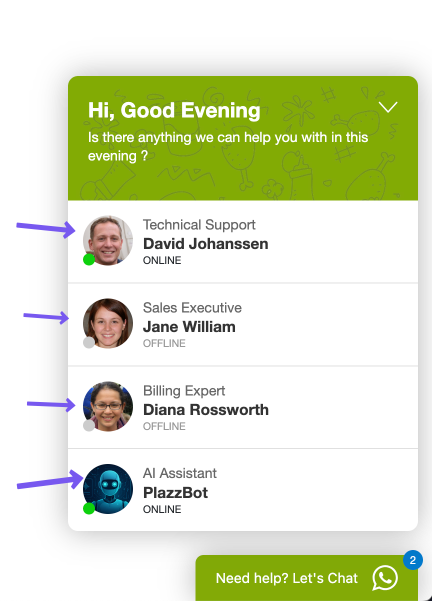
Hi, Im sorry, I don’t really understand what you mean. Do you mean that when a user clicks on the agent’s name, they will be redirected to your booking page?
5 months 5 days ago #2
by TemplatePlazza
Attachments:
The topic has been marked as resolved.
- Posted by Ron Donnicola (7) Offline
Yes, exactly, but I would prefer to avoid modifying the PHP files if possible, to keep things simple and prevent issues with future updates.
What I need is just a button or a link somewhere that redirects the user to our external web page. This could be achieved in either of these two ways:
Directly on the agent's name (so clicking it opens the link instead of the chat).
Inside the chat window, for example embedded in the very first welcome message.
Is there a built-in setting or an easy way within the module configuration to add this link or button?
Thank you!
5 months 5 days ago #3
by Ron Donnicola
What I need is just a button or a link somewhere that redirects the user to our external web page. This could be achieved in either of these two ways:
Directly on the agent's name (so clicking it opens the link instead of the chat).
Inside the chat window, for example embedded in the very first welcome message.
Is there a built-in setting or an easy way within the module configuration to add this link or button?
Thank you!
The topic has been marked as resolved.
- Posted by TemplatePlazza (5474) Offline
This can only be done by modifying the PHP code or creating a template overrideDirectly on the agent's name (so clicking it opens the link instead of the chat).
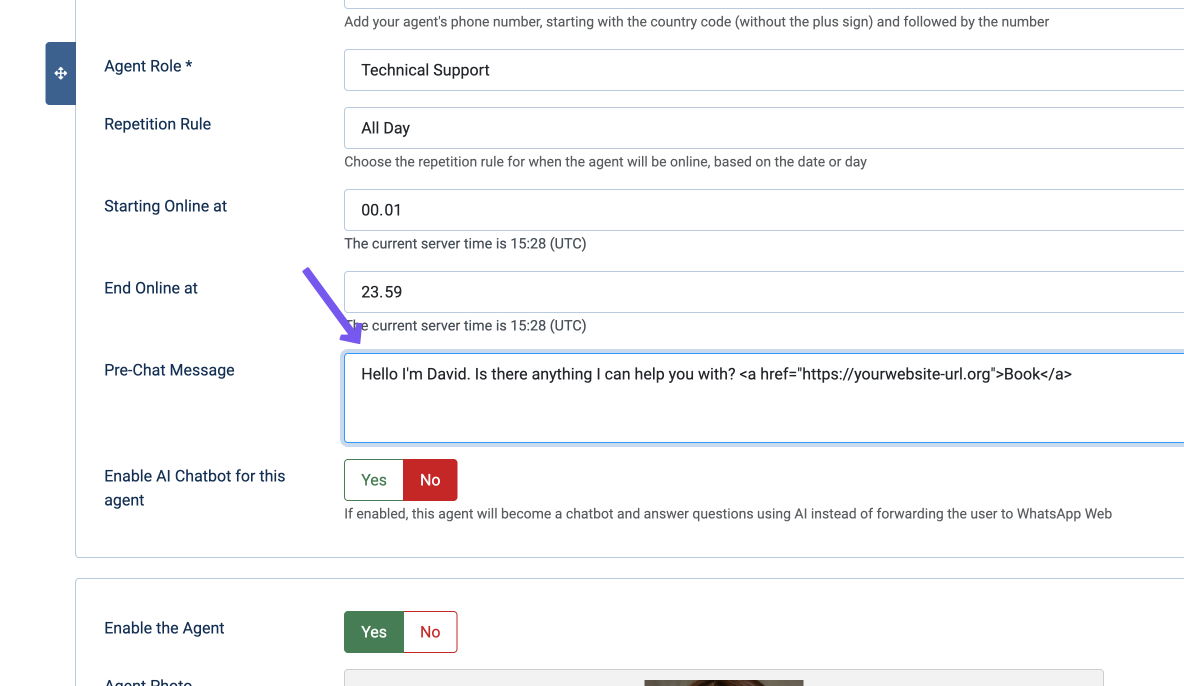
You can do this by inserting the link into the Pre Chat Message field in the module configurationInside the chat window, for example embedded in the very first welcome message.
Attachments:
The topic has been marked as resolved.
- Posted by Ron Donnicola (7) Offline
Hello,
I wanted to thank you for your reply and your helpful suggestion!
Following your advice, I was able to successfully create a button/link to our external WebApp using HTML.
I also wanted to let you know that this workaround works perfectly within the chat header using the Greetings messages. It looks amazing and provides a great user experience on both desktop and mobile.
Thank you again for your support!
Best regards,
5 months 5 days ago #5
by Ron Donnicola
I wanted to thank you for your reply and your helpful suggestion!
Following your advice, I was able to successfully create a button/link to our external WebApp using HTML.
I also wanted to let you know that this workaround works perfectly within the chat header using the Greetings messages. It looks amazing and provides a great user experience on both desktop and mobile.
Thank you again for your support!
Best regards,
The topic has been marked as resolved.
