WhatsApp Multi Age - Bug report: DST (+1 hour) offset issue in agent
- Posted by Ron Donnicola (7) Offline
Hello,
I am using the module based in Switzerland (Europe/Zurich timezone). The server and Joomla global configuration are perfectly aligned, but I have encountered a significant bug regarding how the module handles Daylight Saving Time (DST) for the agents' online/offline schedules.To make the agent turn online/offline at the correct local time (e.g., opening at 11:30 AM), I am forced to "trick" the module by setting the start time to 10:30 AM in the backend.Looking into the file inside the folder, I found the root cause of this behavior. Around the offline support area, the code applies a manual DST modification like this:// Added DST Support
if (HTMLHelper::_('date','now', Text::_('I'))) $online->modify('+1 hour');
And similarly for the end time:
// Added DST Support
if (HTMLHelper::_('date','now', Text::_('I'))){
$lastseen = strtotime($item->agent_online_end) + 60*60;It seems that this manual addition creates a double-offset conflict when Joomla's global timezone is already correctly handling the local time (including DST). Instead of fixing the time, it pushes the module's internal calculation 1 hour ahead, showing wrong countdowns to the user (e.g., showing "22:00" to the frontend user when "21:00" is set in the backend).Currently, I had to temporarily hide the text via custom CSS to avoid confusing my customers, but I would like to know if you can provide a definitive fix or an updated version of the file that processes the Joomla timezone offset natively without this manual hardcoded addition.Thank you in advance for your support!Best regards,
1 month 3 weeks ago #1
by Ron Donnicola
I am using the module based in Switzerland (Europe/Zurich timezone). The server and Joomla global configuration are perfectly aligned, but I have encountered a significant bug regarding how the module handles Daylight Saving Time (DST) for the agents' online/offline schedules.To make the agent turn online/offline at the correct local time (e.g., opening at 11:30 AM), I am forced to "trick" the module by setting the start time to 10:30 AM in the backend.Looking into the
default.phptmplif (HTMLHelper::_('date','now', Text::_('I'))) $online->modify('+1 hour');
And similarly for the
$lastseen// Added DST Support
if (HTMLHelper::_('date','now', Text::_('I'))){
$lastseen = strtotime($item->agent_online_end) + 60*60;It seems that this manual
+1 hour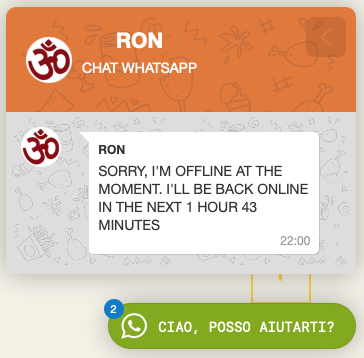
The topic has been marked as resolved.
- Posted by TemplatePlazza (5453) Offline
Hi Ron, thank you for the report. I’ve fixed the issue and uploaded the updated version (2.0.1) please download and reinstall it
1 month 3 weeks ago #2
by TemplatePlazza
The topic has been marked as resolved.
- Posted by Ron Donnicola (7) Offline
Hi, thank you! The time issue is now perfectly fixed in version 2.0.1, and it works like a charm.I noticed just one last minor graphical glitch with the new AI Chatbot feature: inside the AI chat thread, the agent's profile picture () is missing next to the very first welcome message bubble, leaving an empty spacing on the left. The image is correctly displayed in the main agent list and in the header, but not next to the AI's first response bubble.Could you please check the file in the AI thread section and make sure the avatar image is printed there too, just like it happens for human agents?Thanks again for your amazing and fast support!
1 month 3 weeks ago #3
by Ron Donnicola
.wavatardefault.php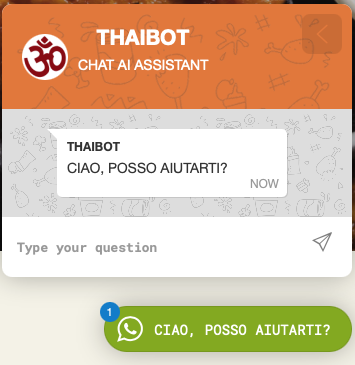
The topic has been marked as resolved.
- Posted by TemplatePlazza (5453) Offline
I have uploaded the update (with the same version number 2.0.1). Please check, download, and give it a try.
1 month 3 weeks ago #4
by TemplatePlazza
The topic has been marked as resolved.
- Posted by Ron Donnicola (7) Offline
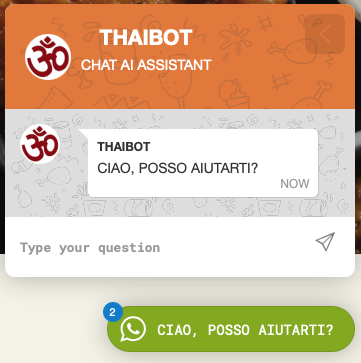
Hi, thank you so much! The AI agent avatar is now perfectly fixed and looks great.However, with this last silent update, a new small bug appeared for human agents when they are ONLINE (like Thiva in my case). The white "back arrow" (close button) in the top right corner of the orange header has completely disappeared, so users cannot go back to the main list. Strangely, the arrow is still there for the AI Agent and for offline human agents, it's missing only for ONLINE human agents.Could you please check the header section in for online agents and restore the back arrow element?Thank you, we are almost at 100% perfection!
1 month 3 weeks ago #5
by Ron Donnicola
default.php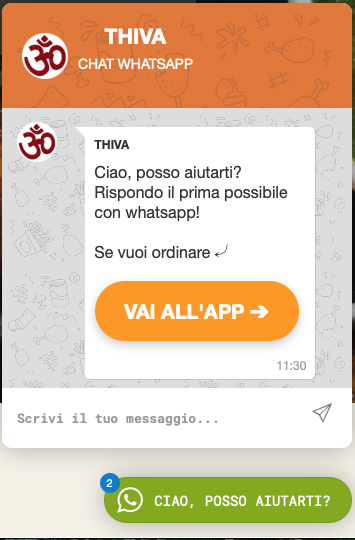
The topic has been marked as resolved.