How to remove the Module title from Mini Frontpage Pro
- Posted by BJ (2) Offline
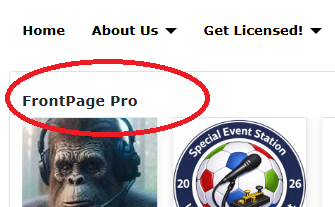
The Frontpage module title is displayed although the Title slider is set to Hide, and I included the following code in the CSS Adjustments.
If I change the Title slider to Show, then 2 Titles appear! I flushed the cache. I unpublished and re-published the module.
How to I make the module title NOT appear?
2 months 4 weeks ago - 2 months 4 weeks ago #1
by BJ
mfp_module_title { display: none !important; }
If I change the Title slider to Show, then 2 Titles appear! I flushed the cache. I unpublished and re-published the module.
How to I make the module title NOT appear?
Last edit: 2 months 4 weeks ago by BJ.
Please Log in or Create an account to join the conversation.
- Posted by TemplatePlazza (5474) Offline
Maybe you forgot the dot at the beginning of the class name? It should be
2 months 4 weeks ago #2
by TemplatePlazza
.mfp_module_title { display: none !important; }Please Log in or Create an account to join the conversation.
- Posted by BJ (2) Offline
The period was there, (I neglected to copy it). In the default view the module title does not appear.
In carousel view it will not go away.
2 months 4 weeks ago #3
by BJ
In carousel view it will not go away.
Please Log in or Create an account to join the conversation.
- Posted by TemplatePlazza (5474) Offline
Can you share your website URL so I can take a look at it?
2 months 4 weeks ago #4
by TemplatePlazza
Please Log in or Create an account to join the conversation.